
NetSec Spotlight: Prisma Browser (Usage Models)

In a previous post, I walked through the key use cases and high-level capabilities of Prisma Browser; a hardened Chromium-based workspace that applies last-mile inspection and enforcement at the point web pages are rendered.
If you are new to the discussion, it is worth reviewing that post before continuing. This article builds on those foundations and examines the inspection, policy, and usage models in more detail.
Inspection Model
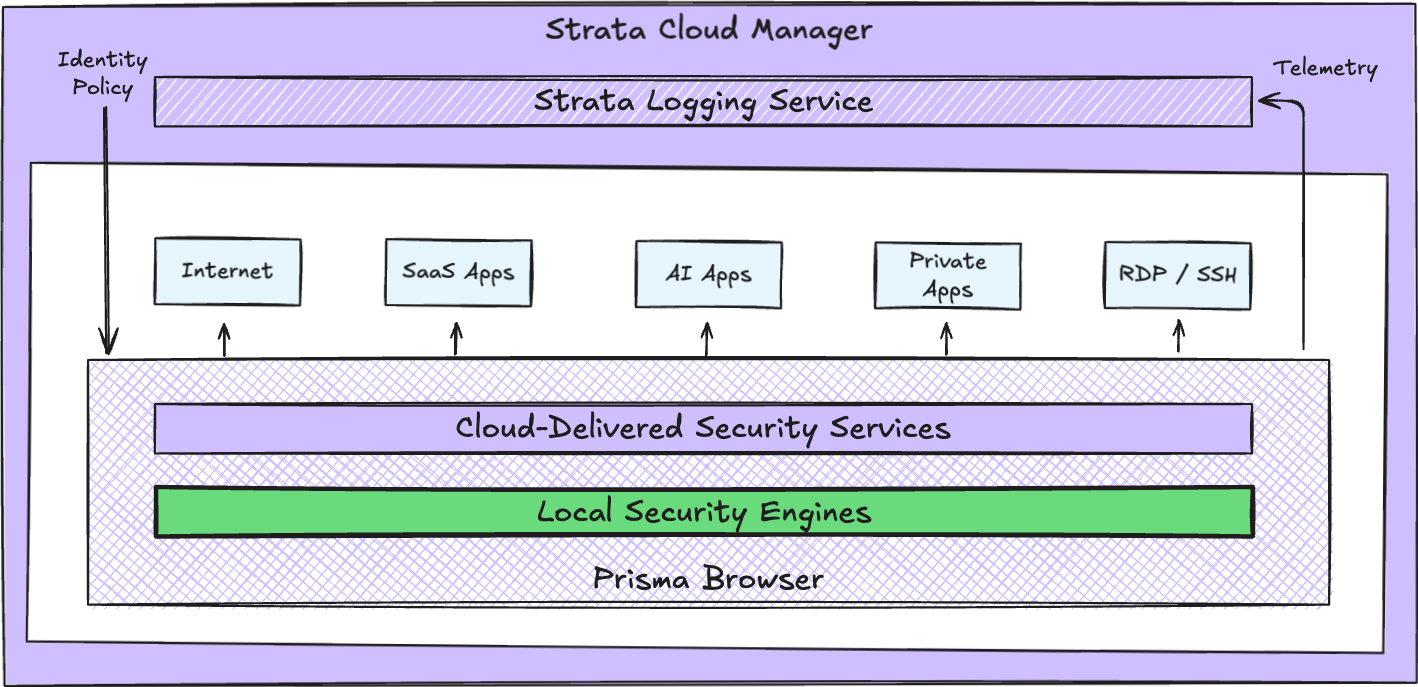
Prisma Browser has full access to the Document Object Model (DOM) where web pages are rendered, and the Code Execution Engine (V8). This means it is able to see and block attack payloads assembled within the browser session, which may not be detected at the network layer.
Many of the security capabilities outlined previously are enabled through Advanced Web Protection, which carries out analysis with techniques such as live page scanning. A verdict on threats is provided using local security engines corresponding to the following security services:
- Advanced URL Filtering: protection against malicious websites and phishing
- Advanced WildFire: malware prevention
- Advanced Threat Protection: real-time defence against evasive threats
- Data Protection: data classification and loss prevention
The majority of decisions are made locally by Prisma Browser. However the browser will also reach out directly and independently to Cloud-Delivered Security Services (CDSS), if escalation and cloud analysis are required.
As well as protecting the user's browser session, several capabilities are applied to protect the browser itself:
- Advanced Browser Protection: prevents zero day exploits and controls website device permissions
- Advanced Extension Security: discovers, monitors, or blocks browser extensions
- Advanced DNS Resolver: prevents DNS hijacking and misconfigurations
These local inspection and protection capabilities allow Prisma Browser to operate with or without a network enforcement point.
Identity and Policy
In an enterprise environment, Prisma Browser integrates with the Identity Provider (IdP), for example Microsoft Entra ID or Okta. Integration is configured with SAML 2.0 or OpenID Connect using the Cloud Identity Engine (CIE).
This provides both directory sync for user and group mappings, and authentication. Just In Time (JIT) access and step-up Multi-Factor Authentication (MFA) can also be enforced by the browser.
Conditional access policies on the IdP are used to enforce access to designated applications and data only through Prisma Browser.
Prisma Browser carries out device posture checks every 90 seconds, including endpoint protection, encryption, firewall, security policies, and system integrity. Access can be restricted or revoked mid-session if device context changes.
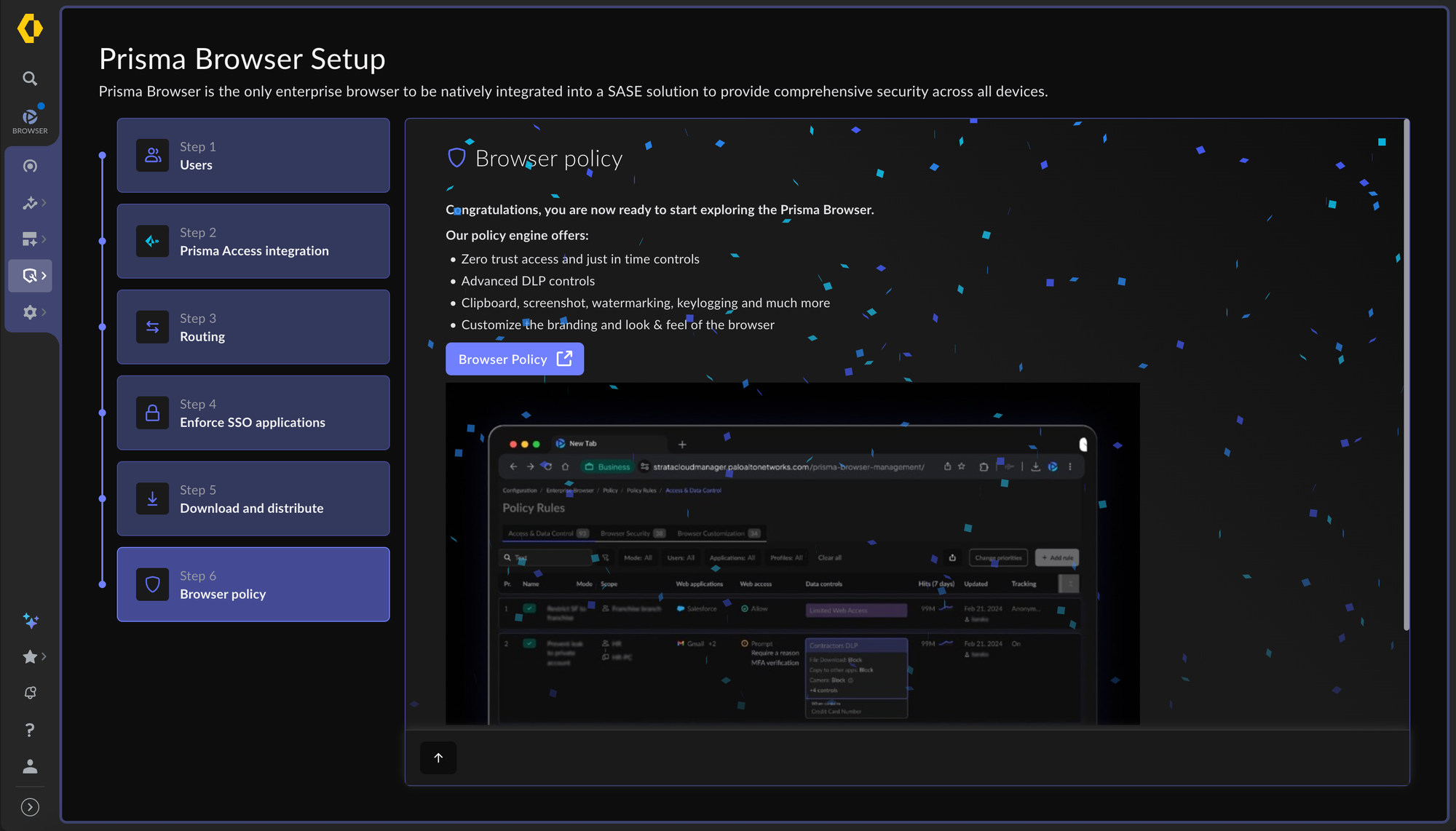
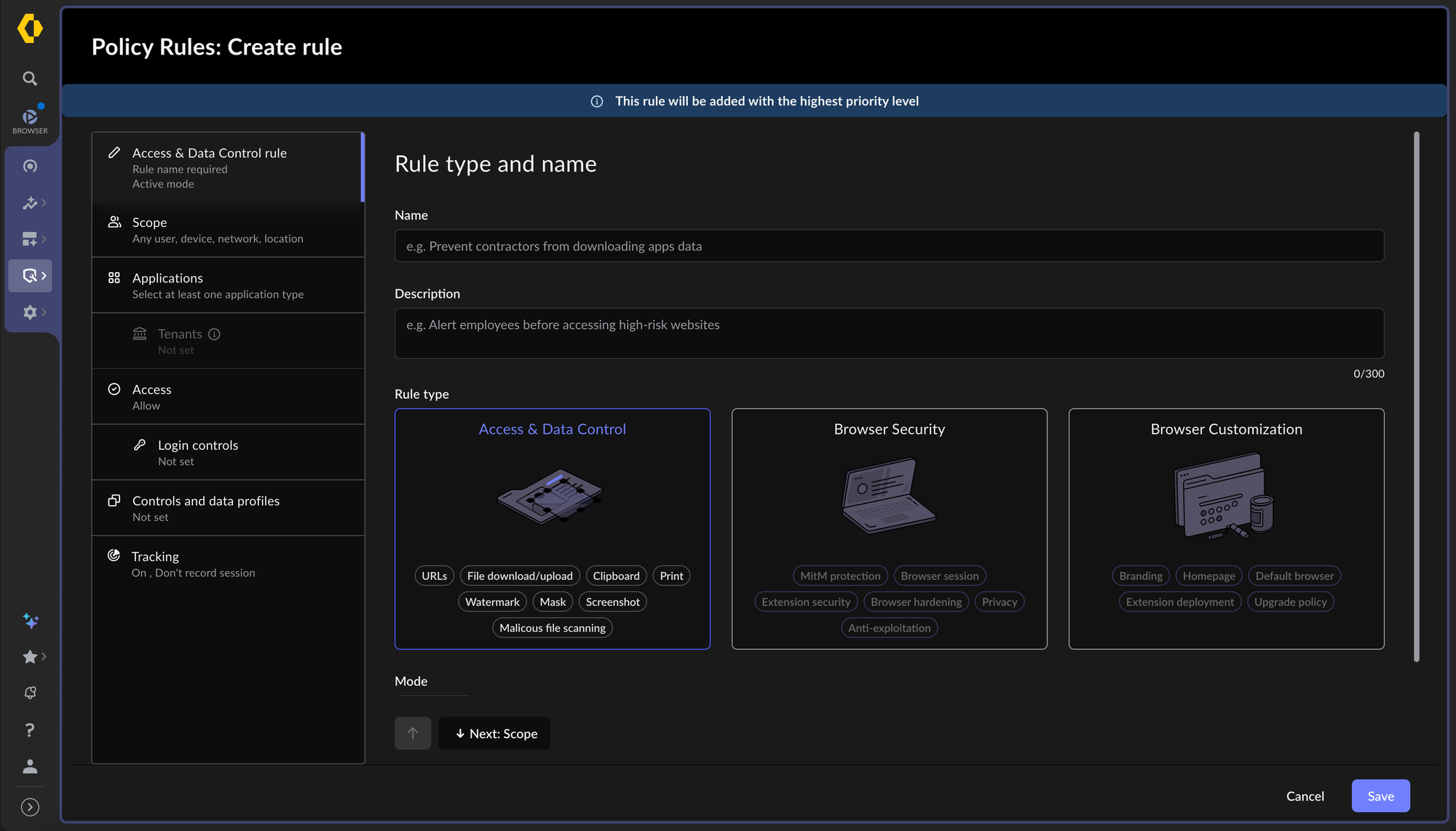
Security rules are configured based on user attributes, device posture, and web applications. They are divided into three distinct categories:
- Access and Data Control Rules: controls supporting data leak prevention, threat protection, and malware protection
- Browser Security Rules: controls relating to the browser session, hardening, extensions, network protection, and privacy
- Browser Customisation Rules: settings for routing, digital experience management, browser customisation, preferences, and branding
Prisma Browser and associated security policies are managed by Strata Cloud Manager (SCM), along with the rest of the network security platform. Telemetry is normalised consistently in the Strata Logging Service (SLS) instance.
Usage Models
There are two usage models for Prisma Browser, defined entirely by whether Prisma Access is processing and routing traffic:
Integrated: traffic is steered through Prisma Access
Standalone: traffic does not route through Prisma Access
If an organisation is using Prisma Access, they can also apply a hybrid usage model. In this case, integrated and standalone are not architectural silos and do not require separate infrastructure or tenants.
The distinction between models is completely policy-driven, based on the user, group, and device context. The following traffic steering rules are available:
- Only route private application traffic through Prisma Access
- Route all traffic through Prisma Access
- Do not route traffic through Prisma Access
In all cases, browser-level inspection continues to apply locally and independently of the network path.
Integrated Model
In an integrated model, the key characteristics are as follows:
- Defined traffic is steered to Prisma Access and inspected by a Security Processing Node (SPN)
- The SPN inspects decrypted traffic between endpoints using the single-pass architecture covered previously
- Private applications are reached through Service Connections or ZTNA Connectors, using the existing Prisma Access traffic path
For managed devices and corporate networks this approach provides defence in depth in a complete SASE platform. The SPN applies network policy to all traffic in transit, while the browser sees actions in the browser session the network never observes, such as copy and paste.
For unmanaged devices and third-party access the browser itself acts as the Prisma Access on-ramp using explicit proxy, hiding the network topology and IP address information of the private application. This approach is fully handled by Prisma Browser and does not need an agent, PAC file, or device enrolment.
Standalone Model
Standalone is used where the customer has no existing Prisma Access tenant or wants to keep traffic isolated from the SASE fabric. The same level of browser-based protection and enforcement occurs, including consumption of content updates, threat intelligence, and detection models managed by Palo Alto Networks.
In a standalone model, the key characteristics are as follows:
- Traffic is not sent to Prisma Access and uses the local internet connection and routing policies
- Traffic is not inspected by a Security Processing Node (SPN), all protection happens within the browser
If a Prisma Access tenant or traffic path does not exist, then private applications can be reached using the Prisma Browser Connector. This approach pairs the browser with a ZTNA Connector VM in the private network, without requiring a full Prisma Access deployment.
The trade-off with using Prisma Browser in a standalone model comes down to scope. Only traffic passing through the browser is secured, making it more suited to scenarios where browser-based work is the whole use case.
In summary, Prisma Browser provides its own policy-driven inspection and enforcement capabilities, enabling:
- Usage models for full SASE integration, standalone, or both in parallel
- Browser-level enforcement that does not depend on a network enforcement point
- Agentless connectivity into Prisma Access, including from unmanaged devices and networks
- Private application access without exposing application IP addresses or requiring inbound rules
- Consistent identity-based policy engine and management with the rest of the platform